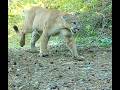
I had never edited a photo online before until yesterday afternoon. Others have blogged about using the photo editing website called BeFunky, so I went there and found lots of fun effects to try. I used this photo I had taken last fall:
I tried all five of BeFunky's "Vintage Colors" effects and here they are:
#1
#2
 |
#3
 |
#4
#5
On BeFunky you can do all kinds of things to photos---crop (trim), brighten, sharpen, add borders, remove spots, add text, change them to black & white, etc.
CLICK HERE to go there and try it out for yourself.
(When there is inconsistent spacing between photos on any of my blogposts, I didn't intentionally do that. I preview my blogposts before publishing them in order to fix mistakes, but the spacing sometimes can't be corrected. Also, concerning this post, I don't know why the number 3 is smaller than the other numbers. I tried to fix it, but with no success.)